

Configuring Domains and DNS Records for ZaneOps
ZaneOps requires specific DNS records to be set up for your domains. The primary environment variables related to domains are:
ROOT_DOMAIN: Used to generate subdomains for deployed web apps.ZANE_APP_DOMAIN: The domain where the ZaneOps dashboard will be accessible after deployment. It can be the same asROOT_DOMAIN.
Required DNS Records
Section titled “Required DNS Records”You need to add the following records in your DNS provider:
* IN A <your-server-ip> # Wildcard Subdomain (`*.<ROOT_DOMAIN>`, to support subdomains dynamically)app IN A <your-server-ip> # ZANE_APP_DOMAINOn cloudflare, it looks like this :

Verifying DNS Records
Section titled “Verifying DNS Records”Ensure that these records are correctly propagated by checking them with a DNS lookup tool such as dig or nslookup :
# Using `dig`dig +short admin.zaneops.dev A
# Using `nslookup`nslookup admin.zaneops.dev
ROOT_DOMAIN
Section titled “ROOT_DOMAIN”This variable is used for generating subdomains for your services.
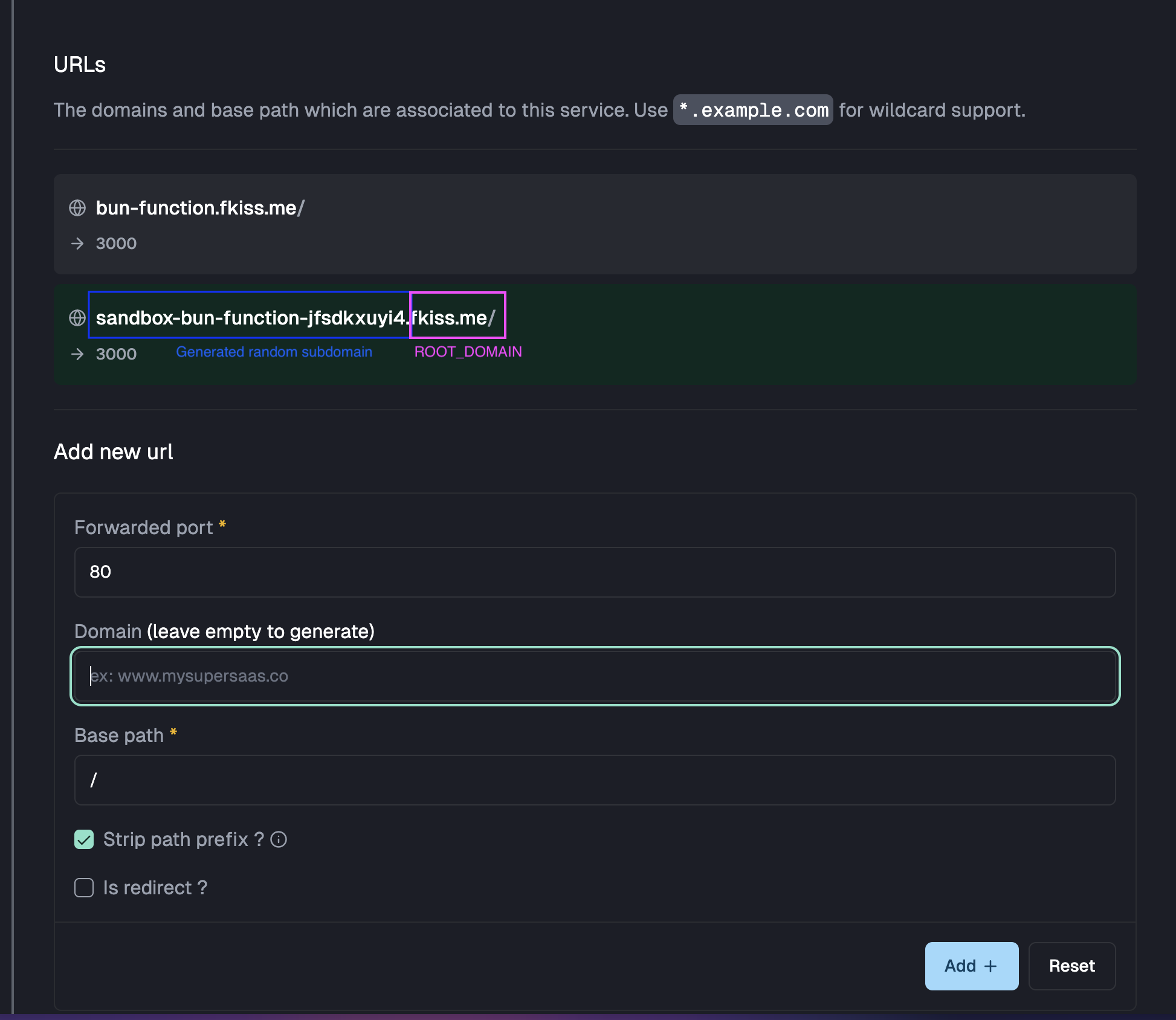
for example if your root domain is zaneops.dev, urls for your services will be generated as project-service-randomid.zaneops.dev. This variable is also used for generating unique urls for your deployments.
In the dashboard, this is what is used when you leave the domain field empty when you add urls for your service :
ZANE_APP_DOMAIN
Section titled “ZANE_APP_DOMAIN”This variable corresponds to the domain where the zaneops dashboard will be accessible.
You can safely set this variable to the same value as the ROOT_DOMAIN, the domain itself is not used for anything else.
Disabling SSL
Section titled “Disabling SSL”By default zaneops, will only expose the port 443 to the public, with all services served over https.
But in some cases where you have another proxy on top on your server (ex: Cloudflare tunnel, Cloudflare proxy),
which handles SSL for you, you might want to disable SSL on your server.
-
To enable HTTP, you can modify the
.envfile and update theMODEvariable tohttp:/var/www/zaneops/.env # ... other env variablesMODE=http -
You will need to restart your zaneops instance :
Terminal window make stop # stop zaneops and all the services managed by itmake deploy # start zaneops again
Using Cloudflare tunnel
Section titled “Using Cloudflare tunnel”Cloudflare tunnel is a popular way to host applications without needing to expose your server IP to the internet.
For hosting zaneops behing cloudflare tunnel, you will need to :
- Disable ssl
- Add the records on the public hostname tab on your tunnel instance, all forwarded to http://127.0.0.1:80 :
