

Compose file syntax reference
Introduced in v1.13.0
ZaneOps accepts standard Docker Compose files with a few extensions and restrictions described below.
File structure
Section titled “File structure”Any valid compose file with at least one services entry works. The ZaneOps-specific additions are all optional except when you need routing or generated secrets.
# ZaneOps-specific: template expressions for generating values at deploy timex-zane-env:  VAR_NAME: "{{ template_expression }}"
# Standard servicesservices:  service_name:    image: image:tag    environment:      KEY: ${VALUE}        # references an x-zane-env variable    deploy:      labels:        # ZaneOps-specific: label-based routing instead of ports        zane.http.routes.0.domain: "example.com"        zane.http.routes.0.port: "8080"
# Standard named volumesvolumes:  data:
# Inline config files (standard content key, ZaneOps adds ${VAR} interpolation and auto-versioning)configs:  my_config:    content: |      server { listen 80; }
How ZaneOps processes your file
Section titled “How ZaneOps processes your file”Before deploying, ZaneOps transforms the compose file through these steps:
- Template processing:
x-zane-envexpressions evaluated,${VAR}references expanded - Service name hashing: all service names prefixed with the stack’s hash (e.g.
app→abc123_app) to prevent DNS collisions across stacks - Network injection: three networks attached to every service automatically (see Networks)
- Config versioning: inline configs created as versioned Docker configs (
my_config_v1,my_config_v2, …) - Computed file: the fully processed compose file (with all variables resolved, service names hashed, and networks injected) is saved and visible in the ZaneOps UI so you can inspect exactly what gets deployed
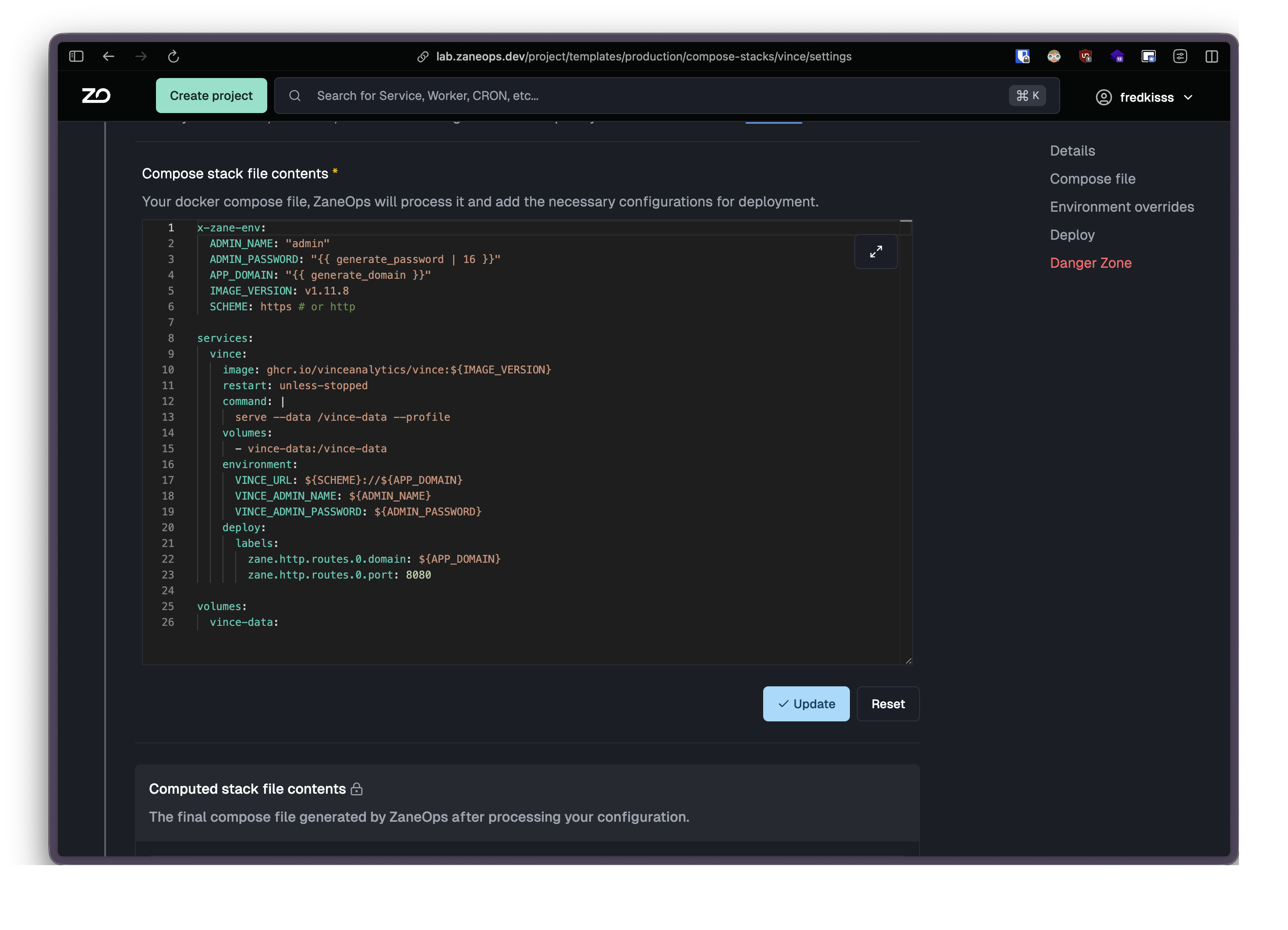
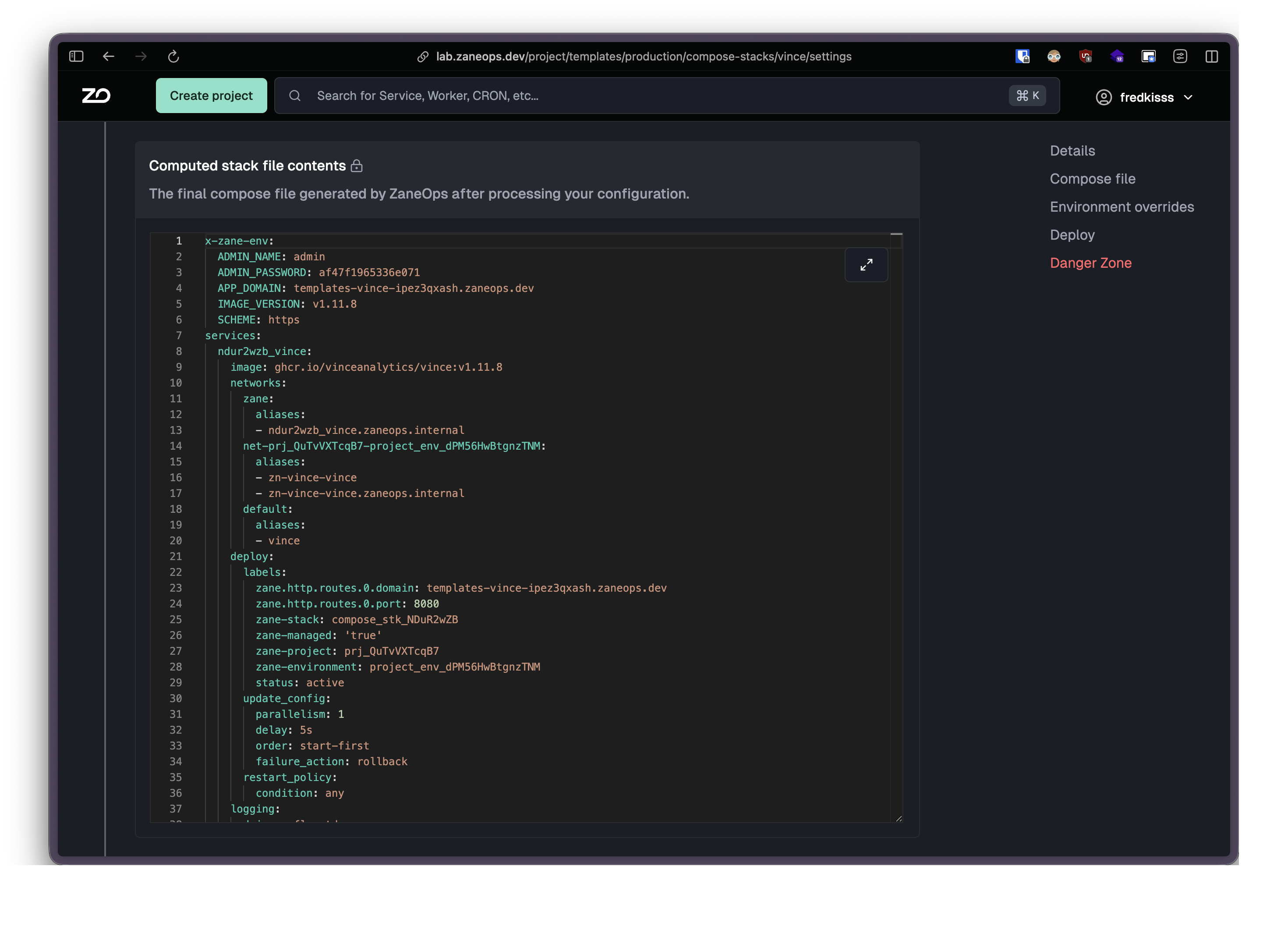
- Stack deployment:
docker stack deploy --with-registry-authis executed using the computed compose file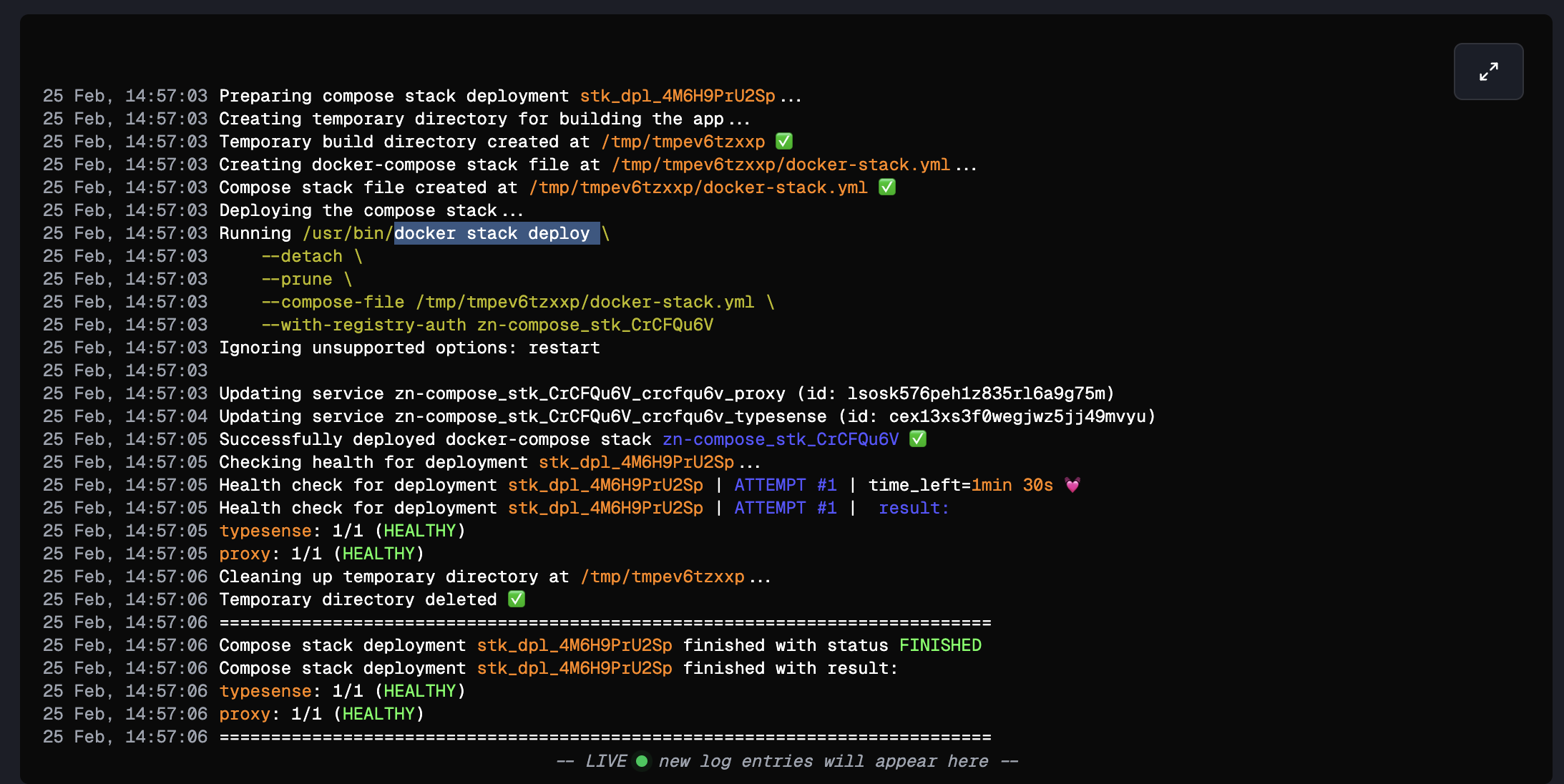
x-zane-env
Section titled “x-zane-env”x-zane-env is a ZaneOps-specific top-level key that replaces the role of a .env file. It lets you define stack-wide variables (either plain values or template expressions) that are then referenced throughout the rest of the compose file.
x-zane-env:  # Plain value (behaves like a .env file entry)  APP_PORT: "3000"
  # Template expression (generates a value at deploy time)  DB_PASSWORD: "{{ generate_password | 32 }}"
All variables are referenced with ${VAR_NAME} syntax (curly braces required). Variables referenced without curly braces ($VAR_NAME) are left as-is and not expanded. Referencing an undefined variable with ${VAR_NAME} expands to an empty string.
x-zane-env:  DB_PASSWORD: "{{ generate_password | 32 }}"
services: app: environment: PASSWORD: ${DB_PASSWORD} # ✅ expanded to the generated value RAW: $DB_PASSWORD # ❌ not expanded, kept literally as "$DB_PASSWORD" MISSING: ${UNDEFINED_VAR} # ⚠️ expanded to an empty string- Values from template expressions are evaluated once on the first deployment and then persisted. A generated password won’t change on subsequent deploys.
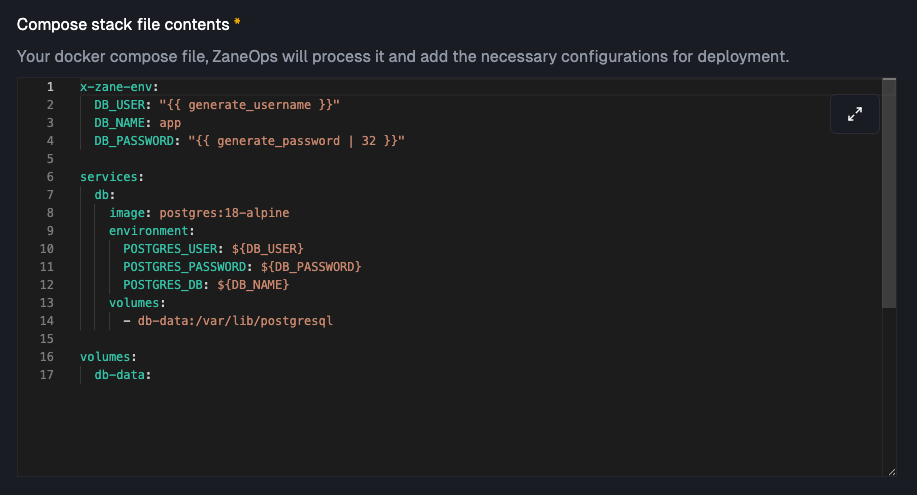
- The variables are persisted as environment overrides:
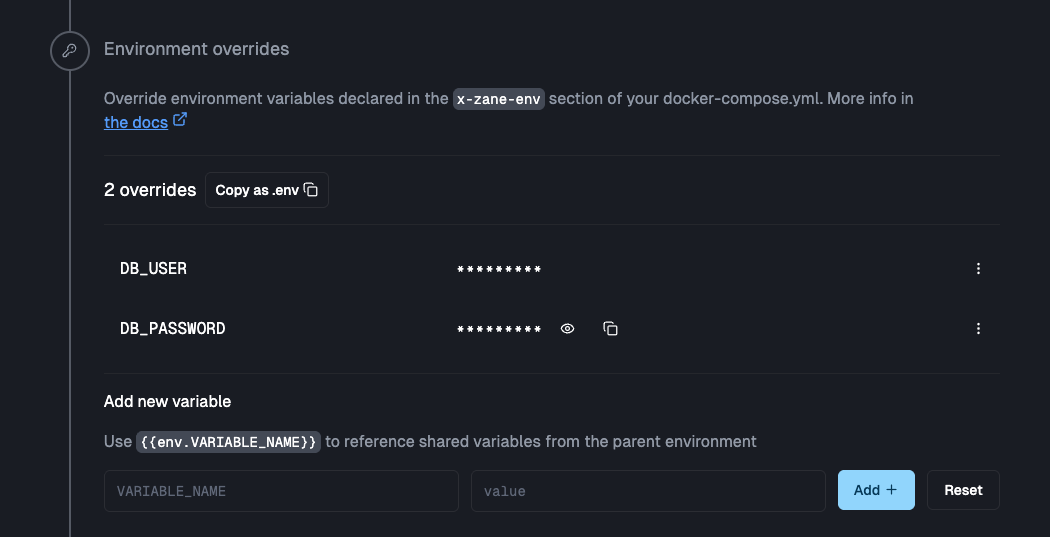
Available template functions
Section titled “Available template functions”generate_username
Section titled “generate_username”Generates a random username in the format {adjective}{animal}{number}.
x-zane-env: DB_USER: "{{ generate_username }}"# Output example: reddog65, bluecat42generate_password | <length>
Section titled “generate_password | <length>”Generates a cryptographically secure random password as a hexadecimal string. Length must be an even number ≥ 8.
x-zane-env: DB_PASSWORD: "{{ generate_password | 32 }}" API_SECRET: "{{ generate_password | 64 }}"# ❌ Wrong: odd lengthPASSWORD: "{{ generate_password | 31 }}"
# ✅ CorrectPASSWORD: "{{ generate_password | 32 }}"generate_base64 | <bytes>
Section titled “generate_base64 | <bytes>”Generates a base64-encoded random string of N bytes. Minimum value is 8.
x-zane-env: ENCRYPTION_KEY: "{{ generate_base64 | 32 }}" SESSION_SECRET: "{{ generate_base64 | 64 }}"generate_slug
Section titled “generate_slug”Generates a URL-friendly slug in the format {adjective}-{noun}-{number}.
x-zane-env: DB_NAME: "{{ generate_slug }}"# Output example: happy-tree-91generate_domain
Section titled “generate_domain”Generates a unique domain scoped to your stack: {project_slug}-{stack_slug}-{random}.{ROOT_DOMAIN}.
x-zane-env: APP_URL: "{{ generate_domain }}" CALLBACK_URL: "https://{{ generate_domain }}/auth/callback"# Output example: my-app-backend-a1b2c3.zaneops.devgenerate_uuid
Section titled “generate_uuid”Generates a UUID v4.
x-zane-env: INSTALLATION_ID: "{{ generate_uuid }}"generate_email
Section titled “generate_email”Generates a fake but valid-looking email address.
x-zane-env: ADMIN_EMAIL: "{{ generate_email }}"network_alias | 'service_name'
Section titled “network_alias | 'service_name'”Generates a stable, environment-scoped hostname. Use this when you need to reference a service in this stack from another service or stack in the same environment.
Format: {network_alias_prefix}-{service_name}
x-zane-env: DB_HOST: "{{ network_alias | 'postgres' }}" REDIS_URL: "redis://{{ network_alias | 'redis' }}:6379"# Output example: my-stack-postgresThe alias is stable across redeployments and scoped to the environment, so services in the same environment share the same alias space.
global_alias | 'service_name'
Section titled “global_alias | 'service_name'”Generates a globally unique hostname, accessible across all projects and environments.
Format: {hash_prefix}_{service_name}
x-zane-env: GLOBAL_DB: "{{ global_alias | 'postgres' }}"# Output example: abc123_postgresUse this only for cross-project or cross-environment communication. Use network_alias to connect in the same environment
and use the service name directly to reference it in the stack.
Variable composition
Section titled “Variable composition”Variables in x-zane-env can reference each other using ${VAR} syntax to build composite values:
x-zane-env:  DB_USER: "{{ generate_username }}"  DB_PASSWORD: "{{ generate_password | 32 }}"  DB_NAME: "{{ generate_slug }}"  DB_HOST: "{{ network_alias | 'postgres' }}"
  DATABASE_URL: "postgresql://${DB_USER}:${DB_PASSWORD}@${DB_HOST}:5432/${DB_NAME}"
services:  app:    image: myapp:latest    environment:      DATABASE_URL: ${DATABASE_URL}
Exposed variables (__ prefix)
Section titled “Exposed variables (__ prefix)”Variables whose name starts with __ are surfaced as environment overrides in the ZaneOps UI. This makes their resolved value visible and copyable, so it can easily be used by services outside the stack.
A typical use case is generating a connection URL for a database stack and exposing it so an external service (a git app, another stack) can reference it without having to reconstruct it manually.
x-zane-env:  DB_USER: "{{ generate_username }}"  DB_PASSWORD: "{{ generate_password | 32 }}"  DB_HOST: "{{ network_alias | 'postgres' }}"  DB_NAME: "{{ generate_slug }}"
  # Exposed in the UI as an environment override  __DATABASE_URL: "postgres://${DB_USER}:${DB_PASSWORD}@${DB_HOST}:5432/${DB_NAME}"
The __DATABASE_URL variable won’t be injected into any service automatically. It exists purely to surface the resolved value in the UI so you can copy it into another service’s environment variables.
Routing
Section titled “Routing”ZaneOps uses label-based routing instead of port mappings. There is no concept of published ports; traffic is routed through ZaneOps’ reverse proxy based on deploy.labels.
Route labels
Section titled “Route labels”services: web: image: nginx:alpine deploy: labels: zane.http.routes.0.domain: "example.com" zane.http.routes.0.port: "80" zane.http.routes.0.base_path: "/" zane.http.routes.0.strip_prefix: "false"| Label | Required | Description |
|---|---|---|
zane.http.routes.{N}.domain | ✅ | Domain name to match |
zane.http.routes.{N}.port | ✅ | Container port to forward traffic to |
zane.http.routes.{N}.base_path | No | Path prefix (default: /) |
zane.http.routes.{N}.strip_prefix | No | Strip base_path before forwarding (default: true) |
{N} is a zero-based sequential index. Add more routes by incrementing the index:
deploy:  labels:    zane.http.routes.0.domain: "example.com"    zane.http.routes.0.port: "8080"
    zane.http.routes.1.domain: "www.example.com"    zane.http.routes.1.port: "8080"
    zane.http.routes.2.domain: "api.example.com"    zane.http.routes.2.port: "3000"    zane.http.routes.2.base_path: "/api"    zane.http.routes.2.strip_prefix: "true"
Route domains can reference x-zane-env variables:
x-zane-env:  APP_DOMAIN: "{{ generate_domain }}"
services:  web:    deploy:      labels:        zane.http.routes.0.domain: "${APP_DOMAIN}"        zane.http.routes.0.port: "8080"
Unsupported properties
Section titled “Unsupported properties”The following standard Docker Compose properties are silently stripped before deployment:
| Property | Reason |
|---|---|
expose | Not meaningful in Swarm mode |
restart | Use deploy.restart_policy instead |
build | ZaneOps requires pre-built images |
container_name | Not meaningful in Swarm mode |
ports is not stripped and will work, but it is strongly recommended to use routing labels instead. Routing labels integrate with ZaneOps’ reverse proxy to handle TLS termination, domain routing, and path-based routing automatically. Publishing raw ports bypasses all of that.
# ✅ Recommended: routing labelsservices:  web:    image: myapp:latest    deploy:      labels:        zane.http.routes.0.domain: "myapp.com"        zane.http.routes.0.port: "8080"
# ⚠️ Works, but gives up ZaneOps routing featuresservices:  web:    image: myapp:latest    ports:      - "8080:8080"
Pausing a service
Section titled “Pausing a service”Setting deploy.replicas to 0 pauses a service without removing it from the stack. Its status in ZaneOps becomes SLEEPING. Set it back to any positive number to resume.
services: worker: image: myapp/worker:latest deploy: replicas: 0 # paused; change to 1 or more to resumeThis is useful for temporarily disabling background workers or non-critical services without tearing down the entire stack.
Volumes
Section titled “Volumes”Relative path bind mounts are not supported and will fail validation:
# ❌ Will failvolumes: - ./config:/etc/app/config - ../data:/app/dataUse inline configs for configuration files, or absolute paths for host directories:
# ✅ Inline configservices:  web:    configs:      - source: app_config        target: /etc/app/config.json
configs:  app_config:    content: |      { "key": "value" }
# ✅ Absolute pathservices:  portainer:    volumes:      - /var/run/docker.sock:/var/run/docker.sock:ro
Docker configs
Section titled “Docker configs”ZaneOps supports inline configs using the standard content key. What ZaneOps adds on top is ${VAR} interpolation inside config content and automatic versioning on redeploy.
services:  web:    image: nginx:alpine    configs:      - source: nginx_config        target: /etc/nginx/nginx.conf
configs:  nginx_config:    content: |      server {        listen 80;      }
Config content supports ${VAR} interpolation from x-zane-env:
x-zane-env:  DB_HOST: "{{ network_alias | 'postgres' }}"
configs:  app_config:    content: |      { "db_host": "${DB_HOST}" }
A common use case is shipping database initialization scripts:
# docker-compose.ymlservices:  postgres:    image: postgres:16    configs:      - source: init_sql        target: /docker-entrypoint-initdb.d/init.sql
configs:  init_sql:    content: |      CREATE EXTENSION IF NOT EXISTS "uuid-ossp";      CREATE TABLE users (        id UUID PRIMARY KEY DEFAULT uuid_generate_v4(),        email TEXT UNIQUE NOT NULL      );
Automatic versioning
Section titled “Automatic versioning”Docker configs are immutable, so ZaneOps appends a version suffix to every config name and manages the lifecycle automatically.
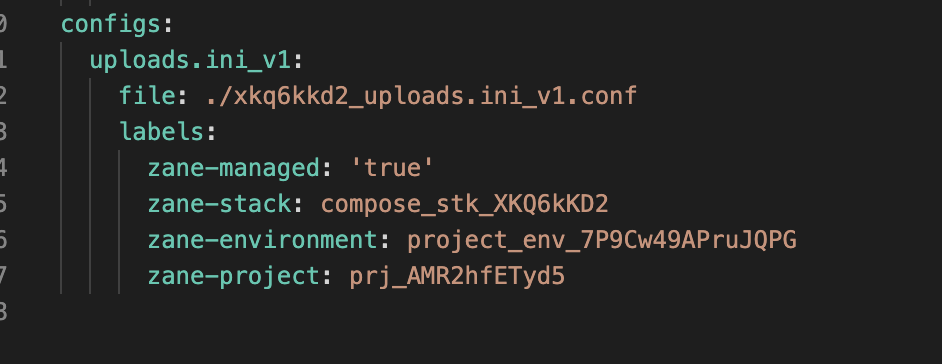
| Deployment | content changed? | Config name used | Old config |
|---|---|---|---|
| 1st deploy | — | nginx_config_v1 | — |
| 2nd deploy | No | nginx_config_v1 (reused) | unchanged |
| 3rd deploy | Yes | nginx_config_v2 (new) | not used anymore |
Networks
Section titled “Networks”Automatic network injection
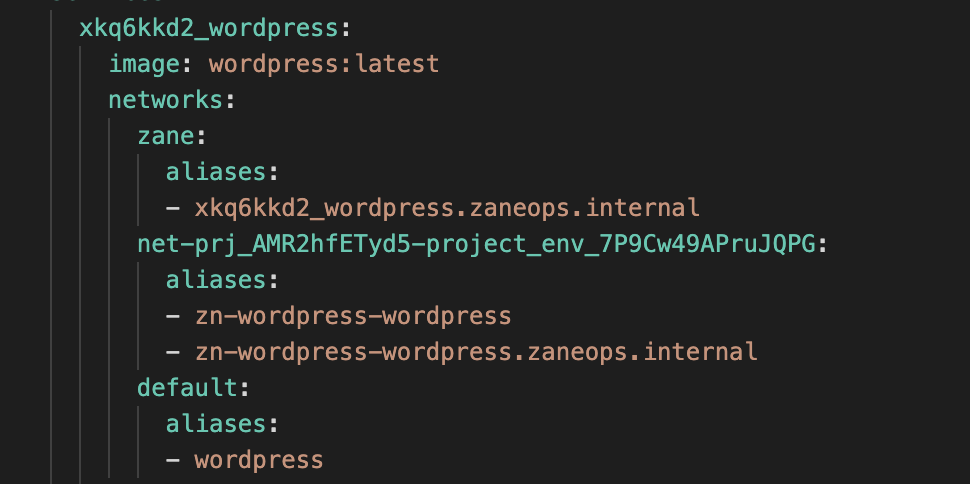
Section titled “Automatic network injection”You don’t need to declare networks for basic service communication. ZaneOps automatically attaches every service to three networks:
| Network | Scope | Purpose |
|---|---|---|
zane (global overlay) | All ZaneOps services | Proxy and ZaneOps-internal communication |
Environment network (zn-env-*) | Same environment | Services in the same env can talk to each other |
| Stack default network | Same stack | Services within the stack use their original names as hostnames |
Service name hashing
Section titled “Service name hashing”ZaneOps prefixes all service names with a stack-specific hash to prevent DNS collisions across stacks:
# In your compose file: app, postgres# Deployed as: abc123_app, abc123_postgresBecause of this, do not hardcode hashed names as hostnames. Use one of these instead:
-
Original service name: works within the stack’s default network:
docker-compose.yml environment:DB_HOST: postgres # resolves in the stack default network -
network_alias: works across services in the same environment:docker-compose.yml x-zane-env:DB_HOST: "{{ network_alias | 'postgres' }}" # e.g. my-stack-postgres -
global_alias: for cross-stack or cross-environment references:docker-compose.yml x-zane-env:DB_HOST: "{{ global_alias | 'postgres' }}" # e.g. abc123_postgres
depends_on
Section titled “depends_on”ZaneOps converts the dict form of depends_on to a list for Docker Swarm compatibility:
# ❌ Dict form: converted automaticallydepends_on:  postgres:    condition: service_healthy
# ✅ Equivalent after conversiondepends_on:  - postgres
The condition field is dropped. depends_on controls startup ordering only; it does not wait for a service to become healthy or ready.
Troubleshooting
Section titled “Troubleshooting”Template expression not evaluated
Section titled “Template expression not evaluated”Template expressions only work inside x-zane-env:
# ❌ Not evaluatedservices:  app:    environment:      PASSWORD: "{{ generate_password | 32 }}"
# ✅ Correctx-zane-env:  PASSWORD: "{{ generate_password | 32 }}"
services:  app:    environment:      PASSWORD: ${PASSWORD}
Unexpected empty value
Section titled “Unexpected empty value”${VAR} references are always expanded. If the variable is not declared in x-zane-env, it expands to an empty string rather than keeping the literal ${VAR} text. Make sure every variable you reference is defined.
Service can’t connect to another service
Section titled “Service can’t connect to another service”Don’t use the hashed service name (abc123_postgres) as a hostname; it’s an implementation detail. Use the original service name (works in the stack default network) or network_alias (works across the environment):
x-zane-env: DB_HOST: "{{ network_alias | 'postgres' }}"Route validation failed
Section titled “Route validation failed”Both domain and port are required per route. strip_prefix must be "true" or "false" (not "yes"/"no").
Config not updated after redeployment
Section titled “Config not updated after redeployment”ZaneOps only creates a new config version when the content changes. If the content is identical to the previous deployment, the existing version is reused. This is expected behavior.
generate_password invalid length error
Section titled “generate_password invalid length error”Length must be an even number ≥ 8 (e.g. 8, 10, 12, 16, 32, 64).
Complete example
Section titled “Complete example”PostgreSQL stack using generated credentials, a network alias, and an exposed connection URL:
version: "3.8"x-zane-env:  # Generated once on first deploy and persisted  POSTGRES_PASSWORD: "{{ generate_password | 32 }}"  POSTGRES_USER: "{{ generate_slug }}"  POSTGRES_DB: "{{ generate_slug }}"
  POSTGRES_VERSION: "18-alpine"
  # Stable hostname for other services in the same environment to connect to  DB_HOST_ENV_NAME: "{{ network_alias | 'postgres' }}"
  # Exposed in the UI so external services can copy the full connection string  __DATABASE_URL: "postgres://${POSTGRES_USER}:${POSTGRES_PASSWORD}@${DB_HOST_ENV_NAME}:5432/${POSTGRES_DB}?schema=public"
services:  postgres:    image: docker.io/library/postgres:${POSTGRES_VERSION:-18-alpine}    restart: unless-stopped    healthcheck:      # $$ escapes the $ so it's passed literally to the shell instead of being expanded by ZaneOps      test: ["CMD-SHELL", "pg_isready -d $$POSTGRES_DB -U $$POSTGRES_USER"]      start_period: 20s      interval: 30s      retries: 5      timeout: 5s    volumes:      - database:/var/lib/postgresql    environment:      POSTGRES_PASSWORD: ${POSTGRES_PASSWORD}      POSTGRES_USER: ${POSTGRES_USER}      POSTGRES_DB: ${POSTGRES_DB}volumes:  database:    driver: local